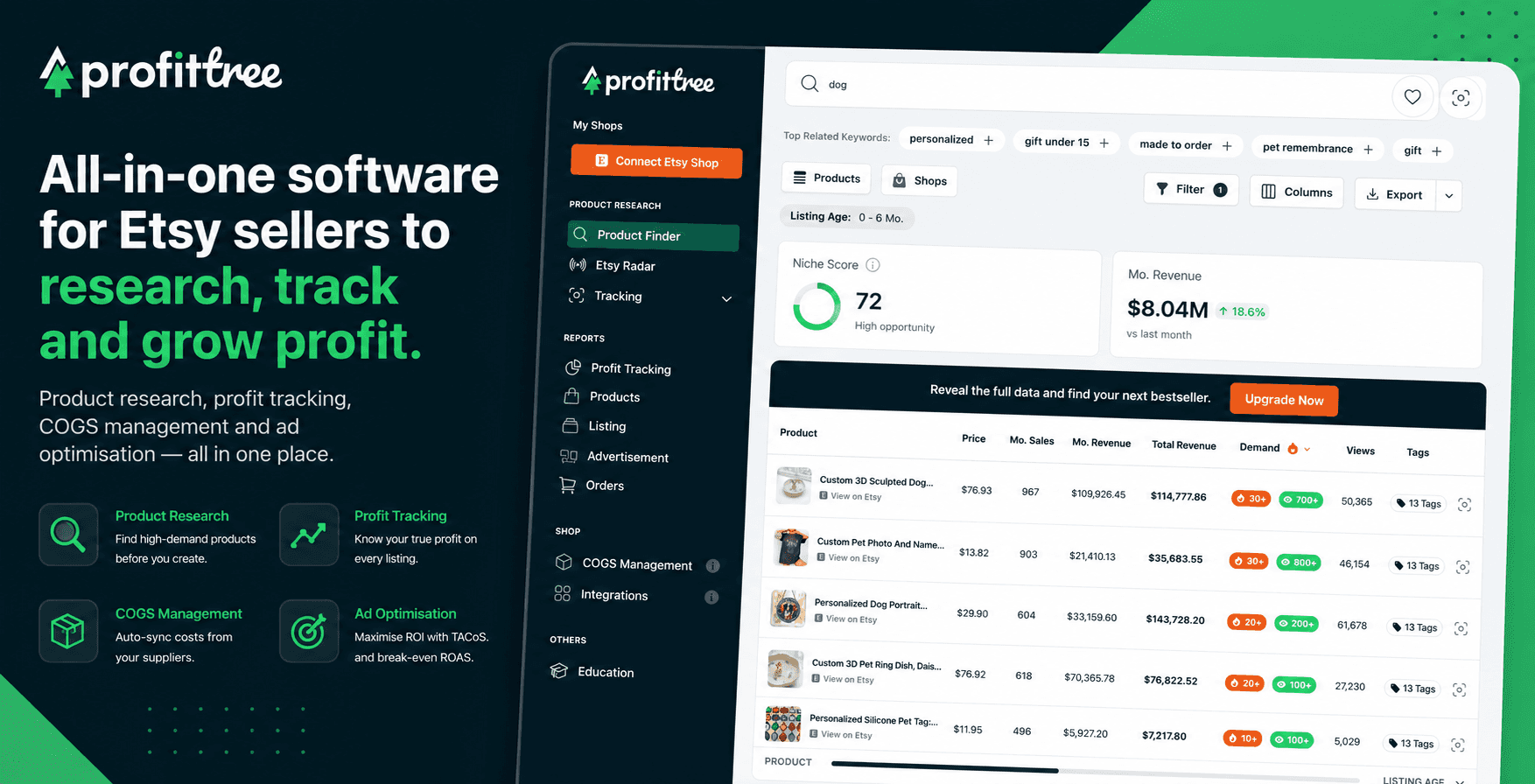
The difference between Etsy sellers who grow consistently and those who plateau usually isn't creativity or effort — it's systems. Sellers who scale use software to handle the tasks that don't require their attention: finding what products have real demand, tracking whether those products are profitable, and making sure ad spend is returning a positive margin.
This guide covers the software capabilities every serious Etsy seller needs in 2026 — and how ProfitTree covers all of them in a single platform: product research, profit tracking, COGS management, and ad optimisation.
Who this guide is for
New Etsy sellers
You're launching or have fewer than 50 listings. You need software that tells you what to sell before you invest time creating products, and that tracks whether your shop is generating real profit from the start.
Established sellers
You have an active shop but rely on Etsy's built-in stats. You need per-listing profit data, competitor intelligence, and ad spend optimisation to scale beyond your current revenue ceiling.
Why Etsy's Built-In Tools Aren't Enough
Etsy provides sellers with basic analytics — views, clicks, revenue, and orders. What it doesn't provide is the data layer that serious sellers need to make informed decisions: true net profit per listing, competitor keyword and sales data, or a clear picture of which ads are margin-positive and which are costing more than they return.
Capability | Etsy built-in | ProfitTree |
|---|---|---|
Revenue tracking | ✓ Yes | ✓ Yes |
Net profit per listing after all fees and costs | ✗ No | ✓ Yes — automatic |
Product demand research before creating | ✗ No | ✓ Yes — Product Finder + Etsy Radar |
Competitor keyword and tag data | ✗ No | ✓ Yes — per listing |
COGS management with auto cost sync | ✗ No | ✓ Yes — Printify + Printful |
TACoS and break-even ROAS per listing | ✗ No | ✓ Yes — Advertisement Report |
Real-time demand signals (Add to Carts, views) | ✗ No | ✓ Yes — live badges per listing |
Can't I just use Etsy's stats and a spreadsheet to track profit?
You can — but it requires exporting multiple CSV reports from Etsy, manually matching production costs per SKU using VLOOKUP formulas, and recalculating every time a supplier price changes. For shops with fewer than 20 listings and low order volume, this is manageable. As your catalogue and order count grow, the manual process becomes a significant time drain and a source of errors that compound over time. ProfitTree automates the entire calculation and updates every 15 minutes — so your profit data is always current without any manual work.
🔍 Software capability 1
Product Research — Find What's Worth Selling Before You Create
Product Finder (web app) and Etsy Radar (Chrome extension)
The most expensive mistake in any Etsy shop is creating products nobody is searching for. Demand validation — confirming that buyers are actively looking for your product before you invest time designing and listing it — is the single highest-leverage thing a seller can do before launching anything new.
ProfitTree's Product Finder lets you search any keyword and instantly see which products have real monthly sales, what competitors are earning, and how strong current buyer demand is — before you create a single listing.
What demand signals ProfitTree shows
🔥 30+Add to Carts — very high real-time buyer interest
🔥 20+Strong demand — solid validation signal
👁 700+Recent views — strong search visibility
👁 200+Good visibility — keywords working well
Product Finder (web app):Search any niche keyword and see every competing listing with monthly sales, revenue, demand badges, Niche Score, and tags — all in one sortable table.
Etsy Radar (Chrome extension):Adds a live data panel to any Etsy listing while you browse — monthly sales, revenue, visibility score, conversion rate, and Add to Carts count without switching tabs.
Competitor keyword intelligence:Open any top-selling listing and pull its exact tags and keywords directly from ProfitTree — use them in your own listing titles, tags, and descriptions.
Niche-level revenue data:Product Finder shows total monthly revenue for an entire niche — so you know the market size before deciding whether it's worth entering.
How do I know if a product idea has enough demand on Etsy?
In ProfitTree's Product Finder, search your target keyword and look for two signals on competing listings: the fire badge (Add to Carts) and the eye badge (recent views). Listings showing 🔥 20+ and 👁 200+ together have strong current buyer activity. If multiple top listings in a niche show these signals, the market is validated. If demand badges are absent across the results, treat it as a red flag before investing time creating for that niche.
What is the difference between Product Finder and Etsy Radar?
Product Finder is inside the ProfitTree web app — you search a keyword and get a full table of competing listings with demand data, sales, revenue, and tags. It's best for dedicated research sessions where you're exploring a new niche. Etsy Radar is the Chrome extension — it adds a live data panel to any Etsy listing page as you browse, giving you instant metrics without leaving Etsy. Both tools show the same core demand signals; the difference is where and how you access them.
📈 Software capability 2
Profit Tracking — Know Your Real Margin on Every Listing
Automated net profit calculation after COGS, Etsy fees, and ad spend
Etsy shows revenue. Revenue is not profit. The gap between your gross sales and what you actually keep — after production costs, Etsy's transaction fees (6.5%), listing fees ($0.20), payment processing charges (~3% + $0.25), and any ad spend — is what determines whether your shop is financially healthy.
What a real sale looks like after every deduction
Example: $35 sale — print-on-demand hoodie
Sale price | +$35.00 |
Etsy transaction fee (6.5%) | −$2.28 |
Etsy listing fee | −$0.20 |
Payment processing (~3% + $0.25) | −$1.30 |
Production cost (Printify hoodie + print) | −$14.50 |
Etsy Ads spend (example) | −$1.80 |
Net profit per sale | $14.92 |
ProfitTree performs this calculation automatically for every order — across all listings, all product variations, and all fee types. Data syncs from Etsy every 15 minutes so your profit figures are always current. For a full breakdown of Etsy's fee structure, see the Etsy Fees page.
What does ProfitTree show that Etsy's dashboard doesn't?
Etsy shows revenue, order count, and basic traffic metrics. ProfitTree shows net profit per listing after every cost is subtracted — COGS, transaction fees, listing fees, payment processing, and ad spend. It also lets you sort your entire catalogue by profitability, which Etsy's dashboard doesn't support. The result is a clear, ranked view of which listings are making money and which are consuming it.
💵 Software capability 3
COGS Management — Automate Your Production Cost Tracking
Auto-sync from Printify and Printful, or bulk CSV upload for any product type
COGS (Cost of Goods Sold) — the direct cost of producing each item you sell, including base product, printing, and packaging — is the most commonly mismanaged number in an Etsy shop. Without accurate COGS per SKU, every profit calculation is an estimate. ProfitTree eliminates that by connecting directly to your production costs.
How to get your costs into ProfitTree
Connect Printify or Printful. Authorize the integration in ProfitTree's Integrations tab. Production costs sync automatically per SKU and update in real time when supplier prices change — no manual entry required.
Upload a COGS CSV for other products.For handmade items or other fulfilment providers, export your SKU list, add your cost per unit in a spreadsheet, and upload the CSV. ProfitTree maps each cost to the correct listing and applies it to every future order for that SKU.
Update costs when prices change.ProfitTree lets you update historical cost records for a specific date range — so past profit calculations reflect the costs that were actually in place at the time of each sale.
What counts as COGS for an Etsy seller?
COGS includes the direct cost of producing or sourcing each item sold: base product cost, printing fees, raw materials, and per-unit packaging. It does not include Etsy fees, shipping charged to customers, or ad spend — those are tracked separately. For print-on-demand sellers, COGS is simply what your Printify or Printful order costs per unit. For handmade sellers, it includes materials, consumables, and any outsourced production costs. See Wikipedia: Cost of goods sold for a standard definition.
💳 Software capability 4
Ad Optimization — Scale Spend on What's Actually Profitable
TACoS tracking, break-even ROAS, and per-listing ad performance reporting
Etsy Ads are one of the fastest ways to grow a shop — and one of the fastest ways to eliminate margin if not managed with accurate data. Most sellers either avoid ads entirely or run them without knowing whether each listing is returning a profit after ad spend. ProfitTree's Advertisement Report fixes that with per-listing advertising metrics calculated against your actual cost data.
Advertising metrics defined
ROAS (Return on Ad Spend)
Revenue generated directly from ad clicks divided by ad spend. Measures immediate ad return but misses organic revenue attributed to the same click. See Wikipedia: Return on ad spend.
Break-Even ROAS
The minimum ROAS at which an ad campaign neither gains nor loses money. Calculated from your product's margin before ad spend. Example: 40% pre-ad margin = 2.5x break-even ROAS. ProfitTree calculates this automatically per listing from your actual cost data.
TACoS (Total Advertising Cost of Sale)
Total ad spend divided by total revenue including organic sales. More complete than ROAS alone — shows the true impact of advertising on overall shop profitability, not just direct ad conversions.
Only advertise validated listings.Use Product Finder to confirm a listing's niche has strong demand signals before running ads. Ads amplify conversion — they can't fix a listing that doesn't convert organically.
Start at $3–$5/day per listingand run for at least 14 days. The Etsy algorithm needs time to optimise ad delivery before results are meaningful.
Target TACoS below 10–15%if you're aiming for a 15–20% net profit margin on print-on-demand products. ProfitTree's Advertisement Report shows TACoS per listing — pause anything consistently above your target.
Scale what's below target.Listings generating strong ROAS with TACoS under your threshold are candidates for increased daily budget — ProfitTree makes those easy to identify.
How is TACoS different from ROAS and why does it matter more for Etsy sellers?
ROAS measures revenue from direct ad clicks only. TACoS measures total ad spend against total shop revenue — including organic sales that may have been influenced by the same ad visibility. For Etsy sellers, a listing that generates strong organic sales alongside its ad performance will show a healthy TACoS even if its direct ROAS looks modest. Using ROAS alone can lead to pausing ads on listings that are actually net profitable when organic revenue is included. ProfitTree shows both metrics per listing so you can make the distinction clearly.
How to Get Started with ProfitTree
ProfitTree is designed to be operational within minutes of connecting your accounts. Here's the setup sequence that gets every feature active from day one:
Create your account and connect your Etsy shop.Go to profittree.io and authorize the Etsy connection. ProfitTree imports your full order history immediately — not just orders from the connection date forward.
Connect Printify or Printful (if applicable) in the Integrations tab. Production costs sync automatically per SKU. For other products, upload your COGS CSV with costs per SKU.
Install Etsy Radar— the free Chrome extension. Once installed, it adds a live data panel to every Etsy listing you visit, showing demand signals, sales data, and competitor tags in real time.
Run your first Product Finder search.Type your target niche keyword and review the demand signals, Niche Score, and monthly revenue. Identify which products have 🔥 20+ Add to Carts and 👁 200+ views — those are your validated targets.
Review your profit dashboard.Sort your existing listings by net profit margin to see which are your true top earners. Use that data to guide which listings to advertise and which product concepts to expand.
Does ProfitTree work for handmade sellers or only print-on-demand?
ProfitTree works for any Etsy seller — print-on-demand, handmade, digital downloads, or physical goods from any supplier. The core profit tracking, Product Finder, and advertising features work the same regardless of how you fulfil orders. The only difference is how production costs get into the system: POD sellers on Printify or Printful use the auto-sync integration, while handmade and other sellers upload a COGS CSV with their cost per SKU.
Everything ProfitTree Does
🔍 Product Finder
Search any niche and see demand signals, monthly sales, revenue, Niche Score, and competitor tags before creating anything.
🔌Etsy Radar (Chrome Extension)
Live demand and sales data on any Etsy listing while you browse — Add to Carts, views, revenue, conversion rate, and tags without leaving Etsy.
📈 Real-Time Profit Dashboard
Net profit per listing after COGS, Etsy fees, and ad spend — updated automatically every 15 minutes as new orders come in.
💵 COGS Management
Auto-sync production costs from Printify and Printful per SKU, or upload a bulk CSV for any other product type.
📊 Per-Listing Profit Reports
Sort your entire catalogue by net margin to find your true top earners — not just highest-revenue listings.
💳 Advertisement Report
TACoS, ROAS, and break-even ROAS per listing — calculated against your actual costs so ad decisions are based on real margin data.
Key Takeaways
Product research first:Use ProfitTree's Product Finder to validate demand — look for 🔥 20+ Add to Carts and 👁 200+ views on competing listings before creating anything. Pull competitor tags directly from the tool to use in your own listings.
Revenue ≠ profit:A $35 sale may return as little as $14–$16 after Etsy fees, production costs, and ad spend. ProfitTree calculates this automatically per listing, updated every 15 minutes — no spreadsheets needed.
Connect your costs:Link Printify or Printful for automatic cost sync. For other products, upload a COGS CSV with your SKU costs. Accurate COGS is the foundation of every profit calculation.
Advertise with margin data:Only run ads on listings with validated demand and a tested conversion rate. Use ProfitTree's Advertisement Report to keep TACoS below 10–15% for print-on-demand sellers targeting 15–20% net margin.
Start in 5 minutes:Connect Etsy, link Printify or Printful, install Etsy Radar, run your first Product Finder search. Your full profit dashboard is live from the moment your accounts are connected.
Conclusion: Build Your Shop on Data, Not Guesswork
Etsy rewards sellers who make consistent, data-backed decisions — about what to sell, how to price it, which listings to advertise, and where to focus product development. The tools Etsy provides natively are a starting point, not a complete picture.
ProfitTree fills the gap: from identifying what products have real buyer demand before you create, to knowing whether each listing is generating genuine net income once it's live, to ensuring your ad spend is scaling what's actually profitable. It's the software layer every serious Etsy seller needs in 2026 — and it covers all four critical capabilities in a single platform.
Everything you need to research, track, and scale your Etsy shop
Product Finder, Etsy Radar, profit tracking, COGS management, and ad optimization — all in one platform. Free to try for 7 days, no credit card required.

