

Most Etsy sellers know their revenue. Very few know their actual profit. The difference — after production costs, Etsy fees, and ad spend are subtracted — is what determines whether your shop is genuinely growing or just staying busy.
ProfitTree is a profit tracking and shop analytics platform built specifically for Etsy sellers. It connects to your Etsy shop, imports your order data automatically, and calculates your net income per listing — so you always have an accurate, up-to-date picture of your shop's financial performance without manual reconciliation.
The Problem with Etsy's Built-In Metrics
Etsy's dashboard shows revenue, orders, and views — but it scatters cost and performance data across multiple sections, none of which are connected. To understand true per-listing profitability, most sellers resort to exporting CSV reports and manually cross-referencing them in Excel or Google Sheets using VLOOKUP formulas. For small shops this is manageable. As your catalogue and order volume grow, it becomes a significant time drain and a source of errors.
What Etsy's dashboard shows: Revenue, order count, views, and clicks — split across Stats, Finances, and individual listing pages.
What it doesn't show: Net profit per listing after production costs, Etsy transaction fees (6.5%), listing fees ($0.20/listing), payment processing fees, and ad spend are deducted.
The result: Most sellers have no reliable way to compare the profitability of one listing against another — making it difficult to know where to focus time, ad spend, or product development. For a full breakdown of Etsy's fee structure, see the Etsy Seller Handbook.
Why can't I just use Etsy's built-in reports to track profit?
Etsy's reports show gross revenue and basic order data, but they don't factor in your production costs (COGS), which vary by product. They also don't consolidate all fee types into a single per-listing calculation. To get true net income per listing from Etsy's data alone, you'd need to manually match COGS data to each order line — a process that's error-prone and doesn't scale beyond a small catalogue.
Why Per-Listing Profit Tracking Changes How You Run Your Shop
Revenue figures are easy to celebrate but misleading as a measure of shop health. A listing generating 200 monthly sales at a $1.50 net margin is less valuable than one generating 50 sales at an $8 net margin — but without per-listing profit data, most sellers can't see that distinction.
Accurate profit tracking per listing directly improves three decisions that affect every Etsy shop:
Pricing:Knowing your exact cost per unit lets you price products to hit a specific margin target rather than copying competitor prices and hoping for the best.
Ad spend:Running ads on low-margin listings is a fast way to eliminate profit entirely. Profit data shows you which listings can absorb ad spend and still return a meaningful margin.
Product development:Understanding which listings generate the highest net income per sale guides where to invest time creating new products or expanding existing product lines.
What profit margin should Etsy print on demand sellers aim for?
A net profit margin of 15–20% after all costs — including production, Etsy fees, and ad spend — is a practical target for print on demand sellers. ProfitTree shows your current margin per listing so you can see at a glance which products are hitting this target and which need pricing or cost adjustments.
How ProfitTree Works
ProfitTree connects to your Etsy shop and, if you use print on demand, to your Printify or Printful account. It imports order data and production costs automatically, then calculates your net income per listing in real time. The full setup takes around 10 minutes.
How to get started — 3 steps
Connect your Etsy shop. Authorize ProfitTree to access your shop data. Order history and fee data import automatically — no CSV exports required.
Upload your COGS. If you use Printify or Printful, production costs sync automatically. For handmade or other products, upload a bulk COGS template (CSV) with your cost per SKU. ProfitTree maps each cost to the corresponding listing.
View your profit reports.Your dashboard immediately shows revenue, costs, fees, and net income per listing — updated as each new order comes in.
How do I upload COGS for products that aren't on Printify or Printful?
ProfitTree supports bulk COGS uploads via a CSV template. The template uses your product SKUs to match costs to the correct listings. Once uploaded, ProfitTree applies the correct cost to every order for that SKU going forward. For handmade sellers managing multiple product variations, this is significantly faster than entering costs manually per listing. For background on what counts as COGS, see Wikipedia: Cost of goods sold.
What the COGS upload looks like
COGS Upload Template — Example
SKU | Product name | Cost per unit ($) | Notes |
|---|---|---|---|
SHIRT-BLK-M | Black unisex tee — medium | 8.50 | Printify base + print |
HOODIE-GRY-L | Grey pullover hoodie — large | 22.00 | Printify base + print |
MUG-WHT-11OZ | White ceramic mug 11oz | 6.75 | Printful base + print |
DOWNLOAD-PLANNER | Digital planner PDF | 0.00 | Digital — no production cost |
ProfitTree Features
📈 Real-Time Profit Dashboard
Revenue, COGS, Etsy fees, and net income update automatically with each new order. No manual reconciliation or end-of-month calculations.
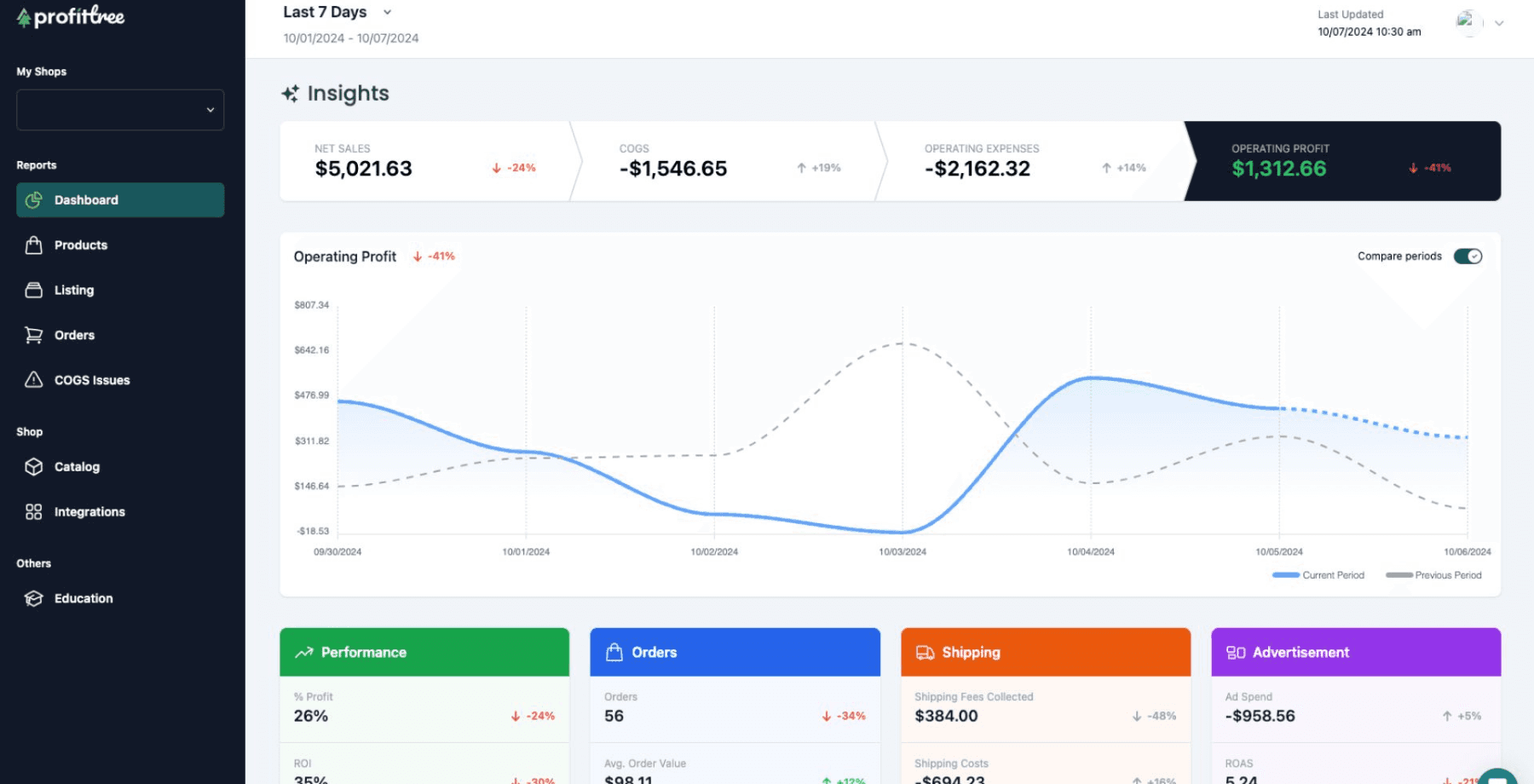
💵 COGS Management
Upload costs in bulk via CSV or sync automatically from Printify and Printful. Costs are mapped per SKU and applied to every order for that product.
📊 Per-Listing Profit Reports
See revenue, costs, fees, and net margin broken down for each individual listing and product variation — not just shop totals.
💳 Advertisement Report
Tracks TACoS (Total Advertising Cost of Sale) per listing — a more complete measure of ad profitability than ROAS alone. Identifies listings where ad spend exceeds target margins.
🔍Product Finder
Research in-demand products and niches before creating anything. Shows monthly sales, revenue, demand signals, and competitor tags for any Etsy keyword.
🔌 Etsy Radar Chrome Extension
Adds a live data panel to any Etsy listing page while you browse — showing monthly sales, revenue, visibility score, and real-time demand without switching tabs.
Manual tracking vs ProfitTree
Task | Manual (Excel / Sheets) | ProfitTree |
|---|---|---|
Import order data | Export CSV monthly, clean manually | Syncs automatically in real time |
Apply production costs | VLOOKUP per SKU, prone to errors | Bulk CSV upload or auto-sync from Printify / Printful |
Calculate Etsy fees | Manual formula per order type | Calculated automatically per transaction |
Per-listing profit view | Requires custom pivot tables | Built-in — sortable by revenue, cost, or margin |
Ad performance tracking | Separate Etsy Ads export, no margin context | TACoS per listing shown alongside profit data |
Update frequency | As often as you manually update | Continuous — every 15 minutes |
Per-Listing and Per-Variation Reporting
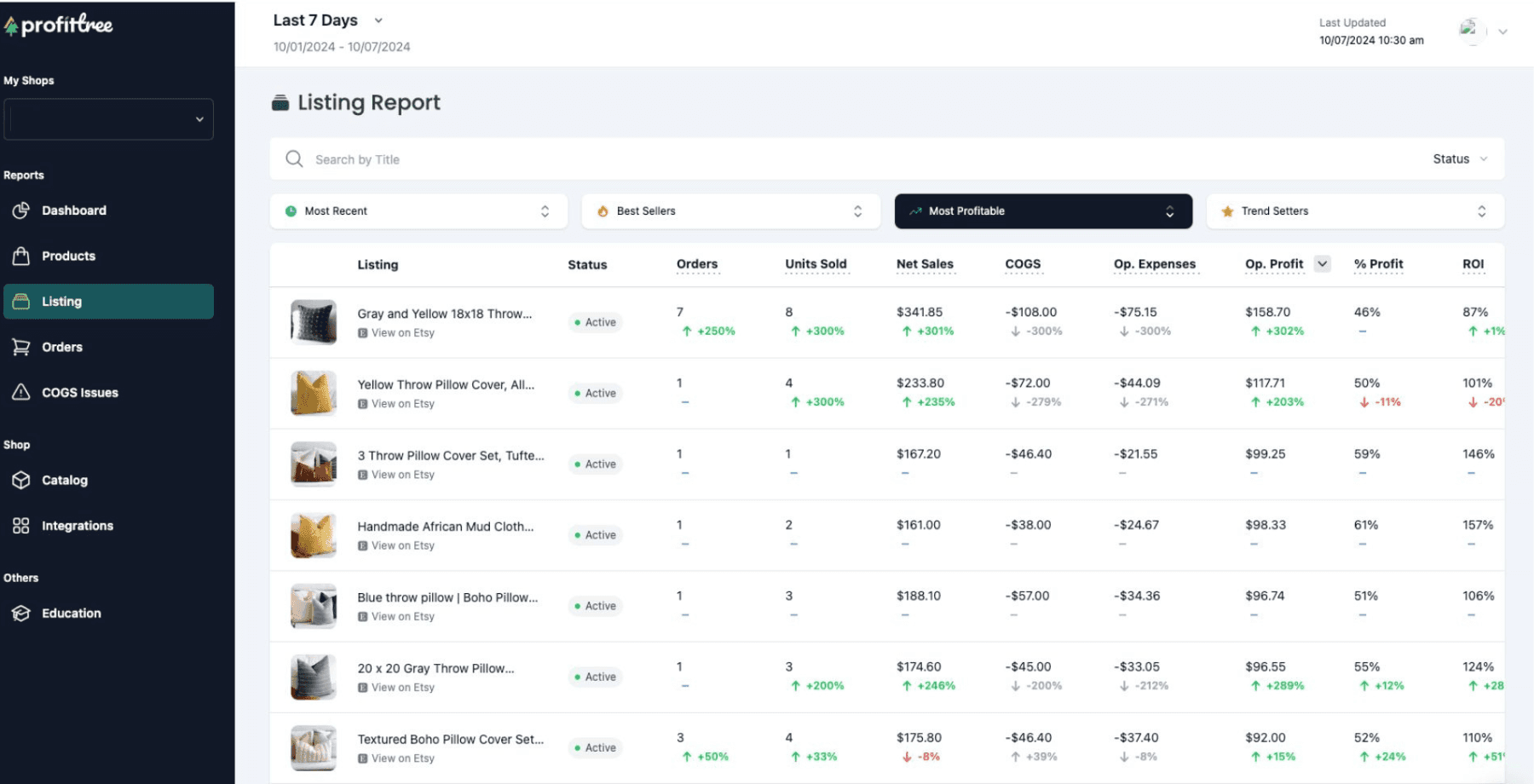
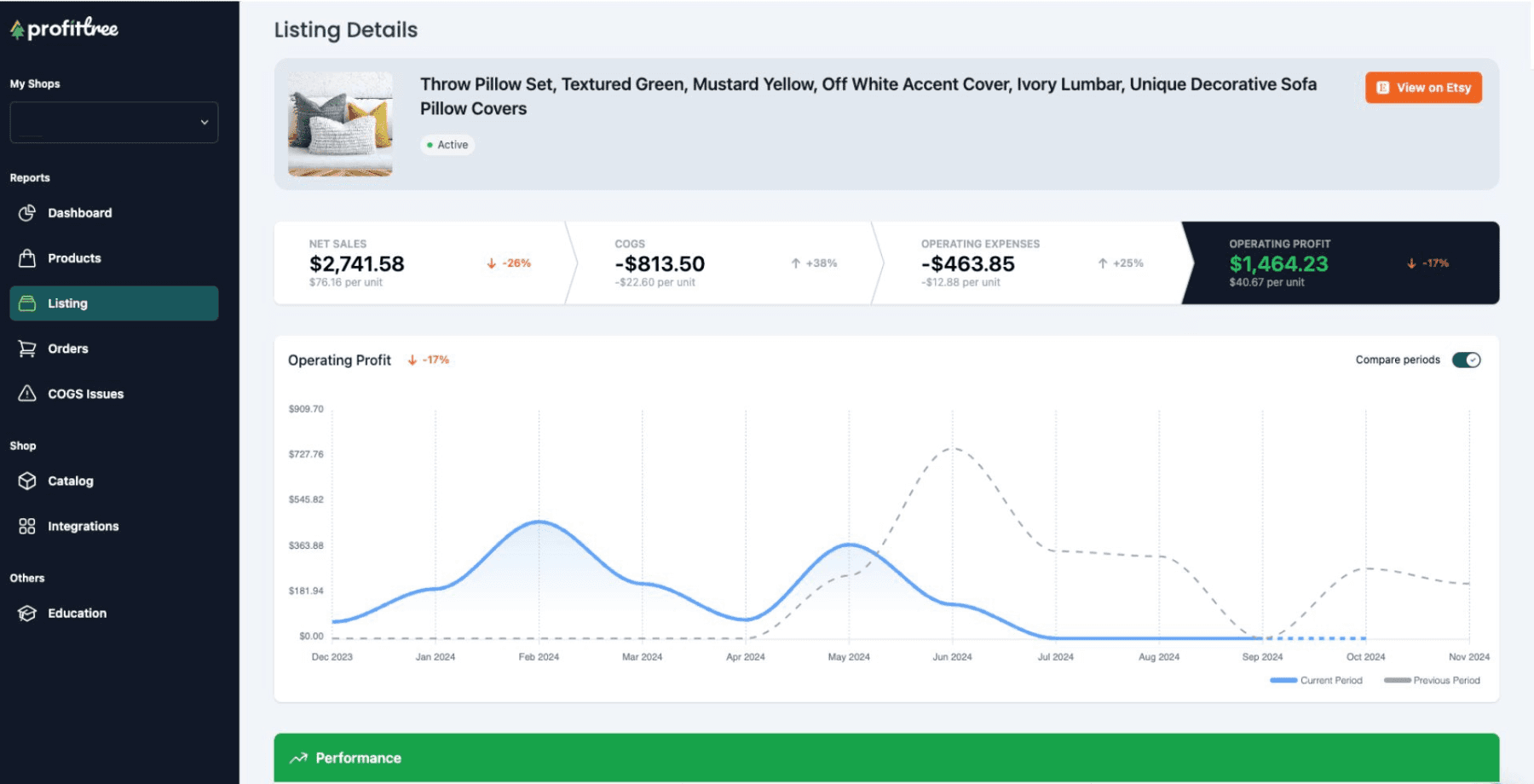
Shop-level profit totals give you a headline number. Per-listing profit data is what lets you make decisions. ProfitTree breaks down net income to the individual listing and product variation level — so you can see not just that your shop is profitable overall, but which specific products are driving that profitability and which are diluting it.
How does ProfitTree calculate profit for listings with multiple variations?
ProfitTree maps your COGS to individual SKUs — so if a medium t-shirt costs $8.50 to produce and a large costs $9.00, each variation gets the correct cost applied. Revenue and fees are calculated per transaction, so every order is matched to the right SKU and its associated cost. The result is accurate per-variation profit data rather than a blended average across the whole listing.
Integrations and Tax Considerations
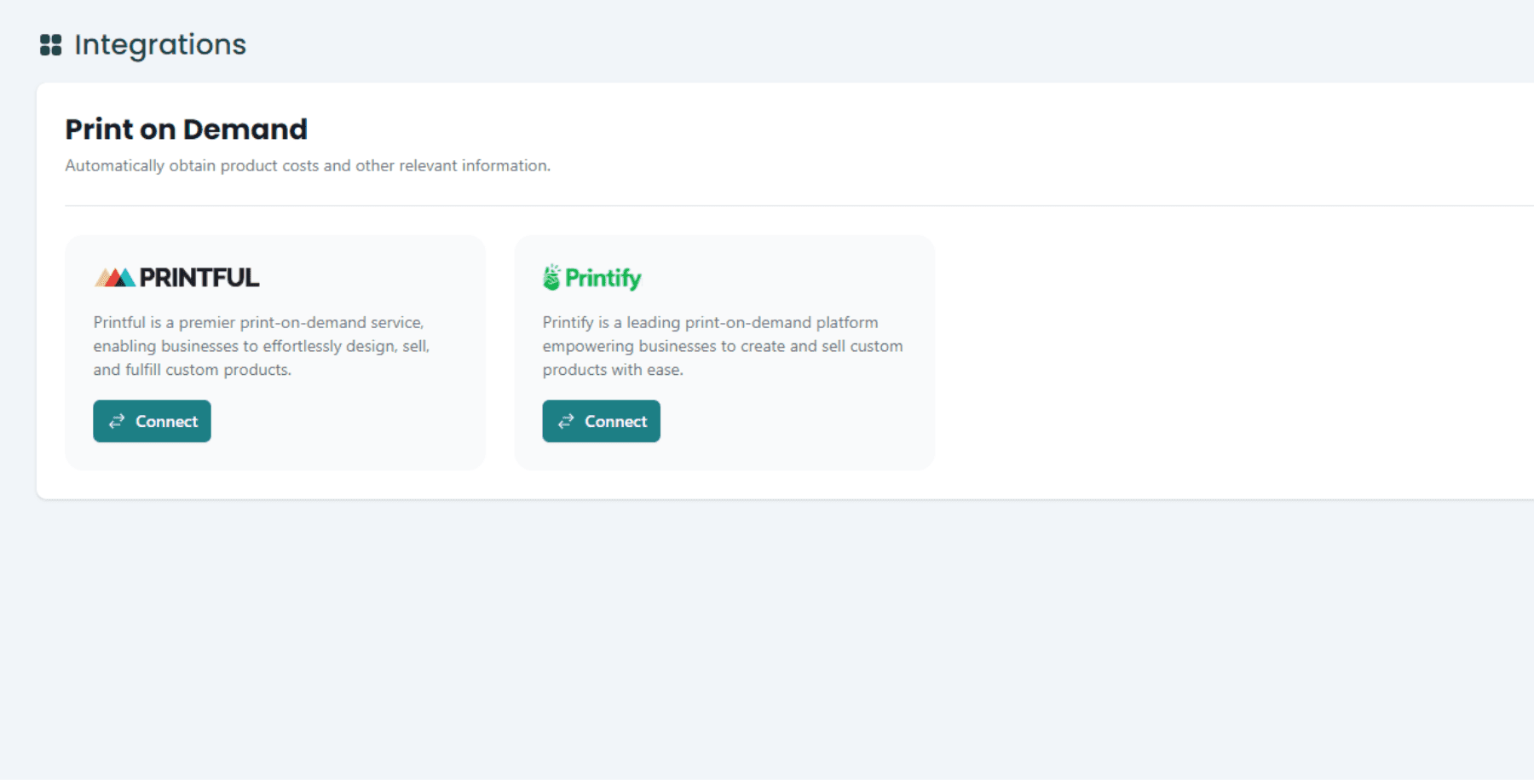
ProfitTree integrates directly with Etsy, Printify, and Printful. Once connected, production costs sync automatically — no manual cost entry required for print on demand products. For sellers using other fulfilment providers or creating handmade products, the bulk COGS CSV upload covers any product type.
Key terms
COGS (Cost of Goods Sold)
The direct costs of producing each item sold — including materials, printing, and packaging. Does not include Etsy fees, shipping to customers, or ad spend. See Wikipedia: Cost of goods sold for a standard definition.
TACoS (Total Advertising Cost of Sale)
Total ad spend divided by total revenue — including both ad-driven and organic sales. More useful than ROAS for understanding the true cost of advertising relative to overall shop profitability.
Net income / net profit
Revenue minus all costs: COGS, Etsy fees, and ad spend. The figure that reflects what you actually keep from each sale.
For self-employed sellers, accurate COGS and fee tracking is also relevant for tax reporting. Your net profit figure from ProfitTree — revenue minus COGS minus deductible fees — provides a reliable basis for income reporting. For guidance on self-employment tax obligations in the US, see the IRS Self-Employed Tax Center.
What integrations does ProfitTree support?
ProfitTree currently integrates with Etsy (order data and fees), Printify (production costs per SKU), and Printful (production costs per SKU). For sellers using other print providers or selling handmade products, production costs can be uploaded in bulk via CSV using your product SKUs. All three integrations are set up from the Integrations section of the ProfitTree dashboard.
Key Takeaways
Etsy's built-in dashboard shows revenue and orders — it does not calculate net income per listing after COGS, fees, and ad spend. ProfitTree fills that gap.
Connect your Etsy shop and Printify or Printful account in around 10 minutes. ProfitTree imports order data and production costs automatically and updates every 15 minutes.
Per-listing profit reports show which products are genuinely profitable and which have thin margins — so you can focus ad spend and product development on the right listings.
The Advertisement Report tracks TACoS per listing, making it straightforward to identify which ads are profitable and which should be paused.
For sellers not on Printify or Printful, upload a bulk COGS CSV using your SKUs. ProfitTree maps costs to the correct listings and applies them to every future order automatically.
Conclusion: Know Your Numbers Before You Scale
Scaling an Etsy shop without per-listing profit data means making decisions based on incomplete information. You might increase ad spend on a listing that's already margin-negative, or invest time expanding a product line that looks busy but isn't actually profitable. ProfitTree eliminates that ambiguity.
With accurate, automatically updated per-listing profit data — covering COGS, Etsy fees, and ad spend in a single dashboard — you have the information needed to make every significant shop decision on evidence rather than estimates.
Want to know more? Watch our video breakdown on how ProfitTree helps Etsy sellers stay ahead.

