Running a profitable Etsy print on demand shop involves more moving parts than most sellers expect: knowing which products are worth creating in the first place, tracking real costs, generating mockups at scale, handling personalized orders efficiently, and making sure ad spend is generating actual profit — not just revenue.
This guide covers three tools that address each of those bottlenecks directly — what each one does, who it's for, and how to get started.
Three tools at a glance
Tool | Primary benefit | Best for | Integrates with |
|---|---|---|---|
ProfitTree | Product research, profit tracking, COGS management, ad optimisation | Sellers who want data from product discovery through to profitability | Etsy, Printify, Printful |
Simply Listed | Bulk mockup generation and multi-SKU listing automation | Sellers launching multiple designs regularly | Printify, Etsy |
HelloCustom | Automated personalisation fulfilment | Sellers offering personalised products at scale | Canva, Etsy, print providers |
1. ProfitTree
Product research, profit tracking, COGS management, and Etsy ads optimization — in one platform
ProfitTree covers the full lifecycle of a print on demand product — from finding what's worth selling, to knowing whether it's actually profitable once it's live. Most sellers use separate tools or manual research for each stage. ProfitTree connects them in one place.
Feature 1 — Find in-demand products before you create anything
The most expensive mistake in print on demand is creating products nobody is searching for. ProfitTree's Product Finder and Etsy Radar solve that by showing you real demand data — top-trending niches, in-demand products, competitor sales volumes, and revenue estimates — before you invest time designing or listing anything.
Web App —> Product Finder
Search any keyword and see every competing listing with monthly sales, revenue, demand indicators, and tags. Shows niche-level monthly revenue so you know the total market size before entering.
Chrome Extension -> Etsy Radar
Adds a live data panel to any Etsy listing page while you browse — showing monthly sales, revenue, visibility score, conversion rate, and real-time demand signals without leaving Etsy.
Both tools show ProfitTree's demand badges — real-time signals pulled directly from Etsy buyer activity:
🔥 10+Sold in the Last 24 Hours — very high current buyer interest
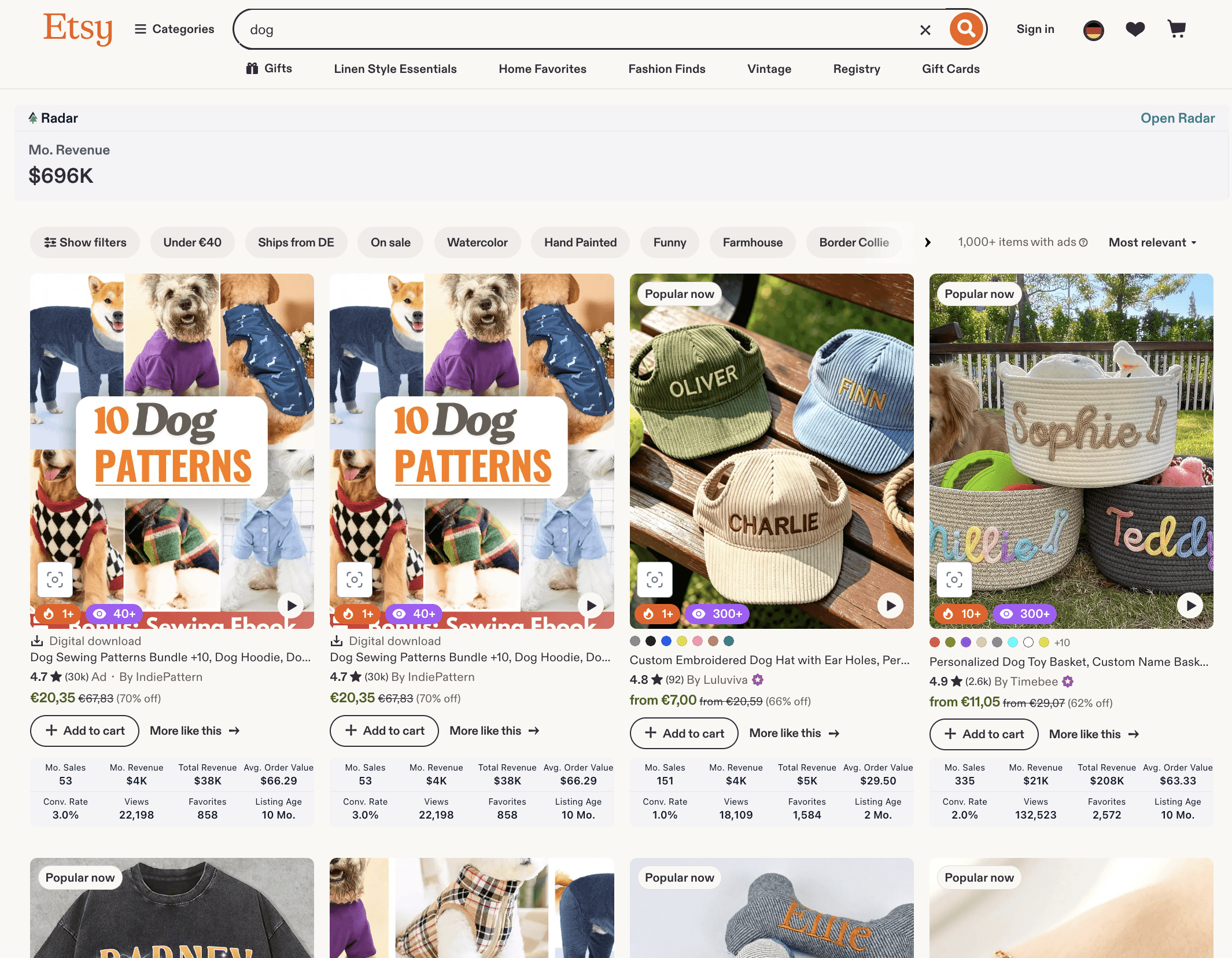
Search any niche in Product Finder and sort by demand to see which products have the strongest current buyer interest.
Check the Niche Score and total monthly revenue to understand how competitive a market is before creating for it.
Open any top-selling listing and pull its exact keywords and tags — use these directly in your own listing titles, tags, and descriptions.
Use Etsy Radar while browsing to get instant sales and revenue data on any listing without switching tabs.
Feature 2 — Know your real margins on every listing
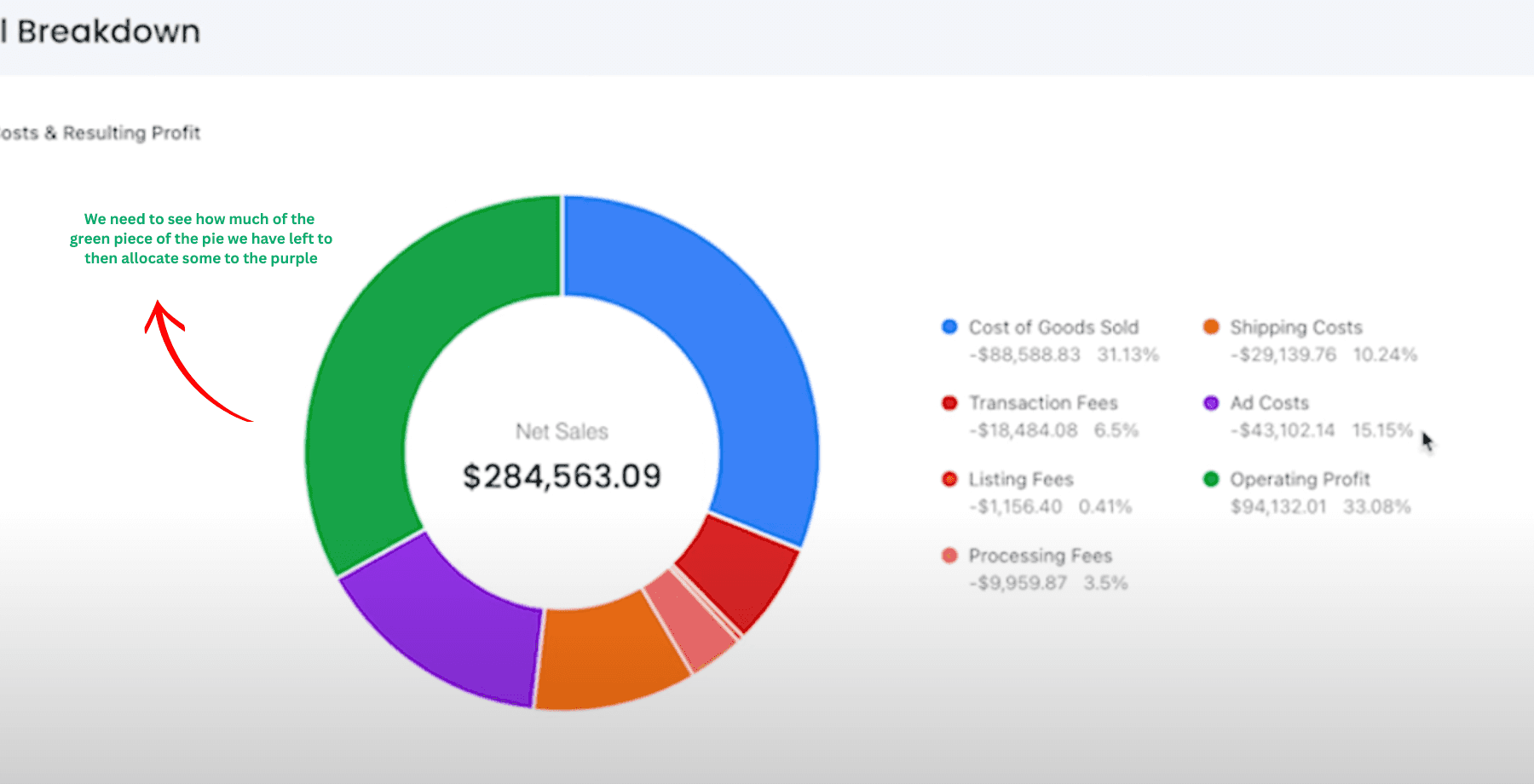
Once you've found a product worth selling and it's live, the next question is whether it's actually profitable. COGS (Cost of Goods Sold — the total production cost per unit including base product, printing, and packaging fees) is the number most sellers either estimate loosely or ignore entirely. ProfitTree pulls COGS in automatically from Printify and Printful, so your margin calculations are always accurate. For a standard definition, see Wikipedia: Cost of goods sold.
What you actually keep
ProfitTree makes all four deductions visible per listing. Most Etsy sellers see their revenue figure and assume the business is healthy — ProfitTree shows which products are genuinely profitable and which are generating sales volume but not income.
What does ProfitTree measure that Etsy's dashboard doesn't?
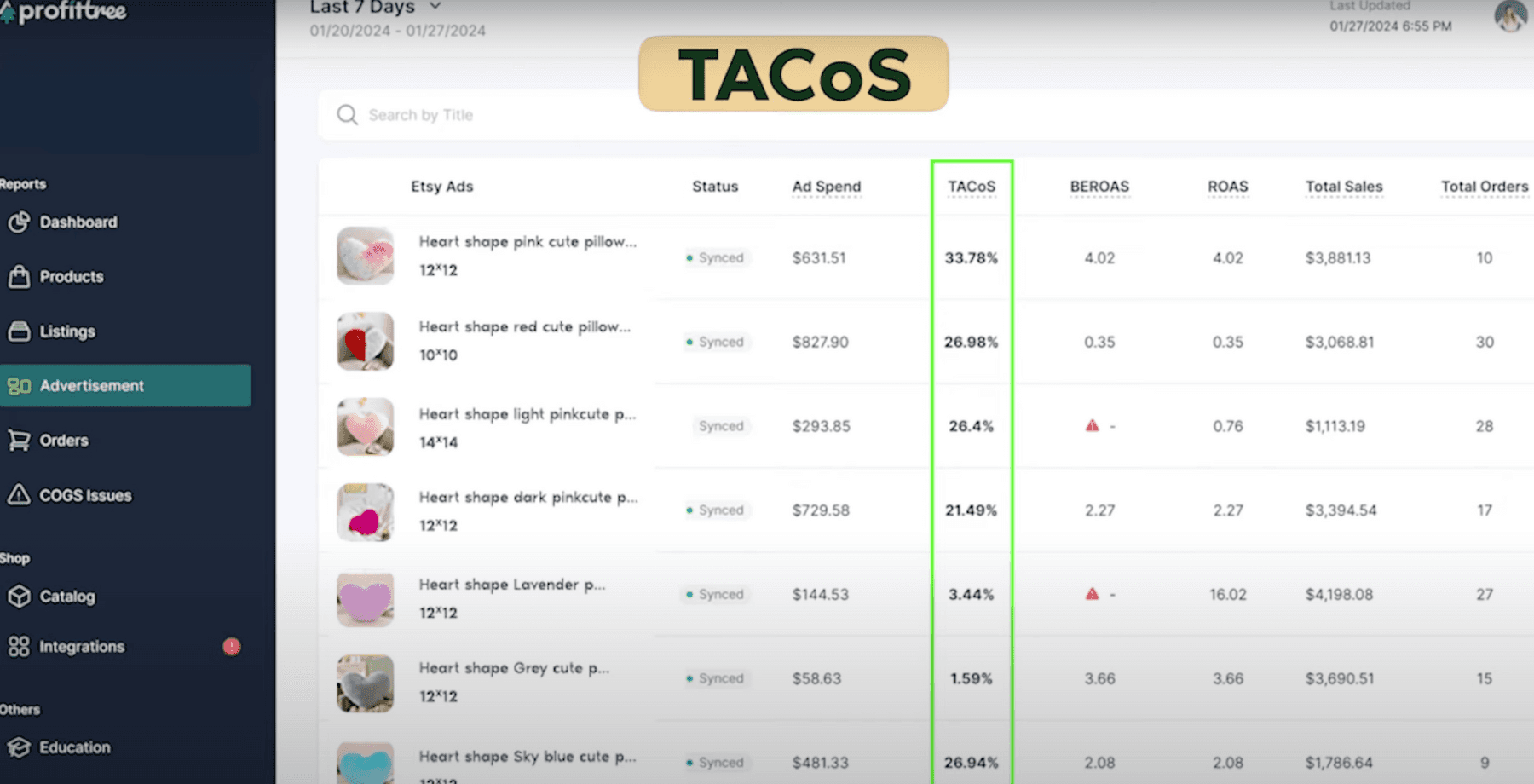
Etsy's dashboard shows revenue and order counts. ProfitTree shows net profit per listing after COGS, Etsy transaction and listing fees, and ad spend are subtracted. It also calculates TACoS (Total Advertising Cost of Sale) per listing — a more complete measure of ad performance than ROAS, because it accounts for all revenue generated from a click, not just the direct ad conversion.
Feature 3 — Scale ad spend on what's actually profitable
Key metrics defined
ROAS (Return on Ad Spend)
Revenue generated directly from ad clicks divided by ad spend. Measures the immediate return on a specific ad — but does not capture organic revenue or repeat purchases triggered by the same click.
TACoS (Total Advertising Cost of Sale)
Total ad spend divided by total revenue including both ad-driven and organic sales. Gives a more complete picture of how advertising affects overall shop profitability, not just the direct conversion.
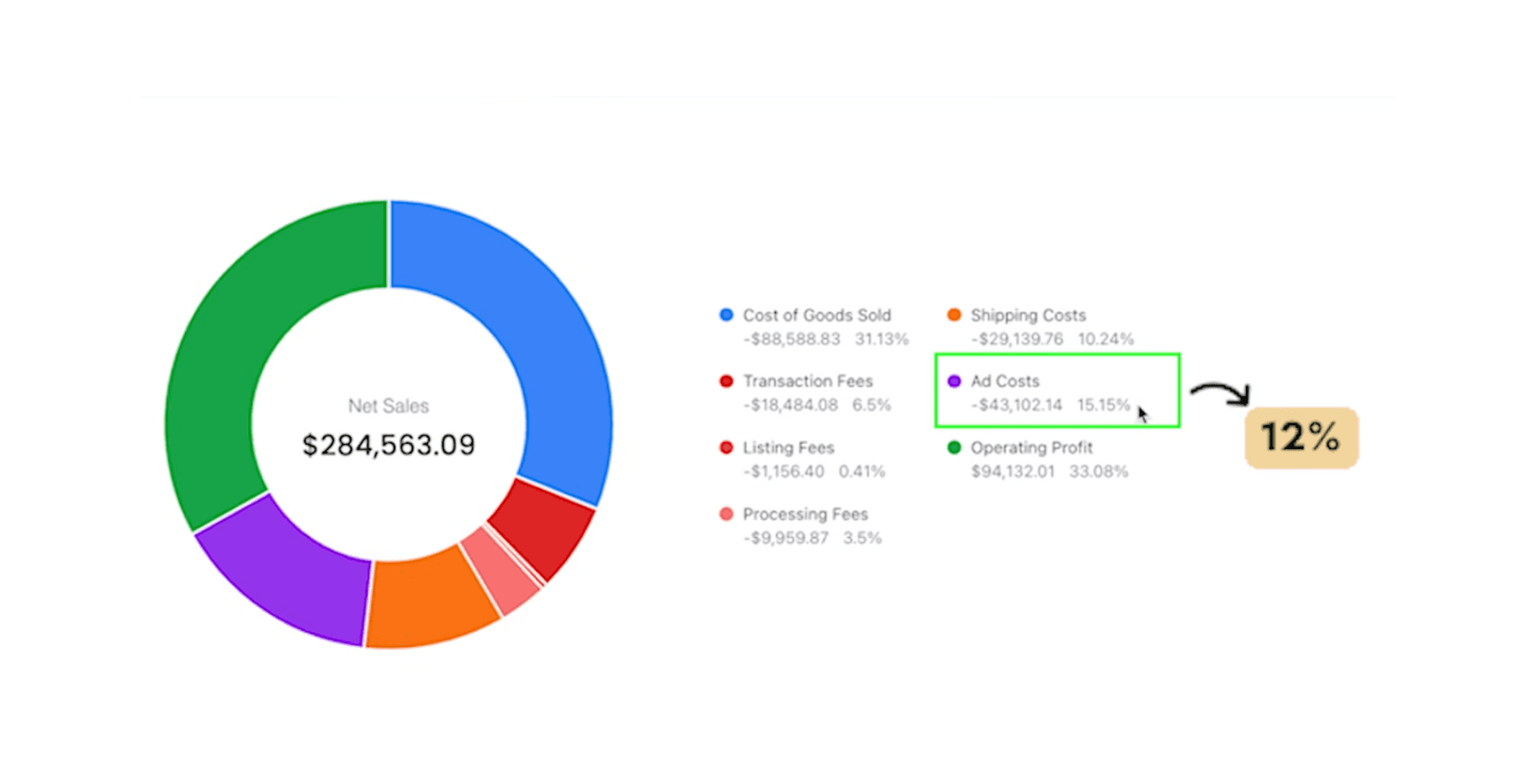
For print on demand sellers targeting a 15–20% net profit margin, keeping TACoS below 10–15% is a practical working benchmark. ProfitTree's Advertisement Report shows TACoS per listing — making it straightforward to identify which listings are exceeding your target and should have ads paused, and which are performing efficiently and warrant increased budget. For more on Etsy's advertising tools, see the Etsy Advertising Help Center.
What TACoS should print on demand sellers target?
If you're targeting a 15–20% net profit margin after all costs, keeping your TACoS below 10–15% is a reasonable benchmark. The exact number depends on your product margins and fee structure. ProfitTree's Advertisement Report shows TACoS per listing so you can identify which listings are within target and which should have ad spend paused or reduced.
2. Simply Listed
Bulk mockup generation and multi-SKU listing automation for Printify sellers
Simply Listed solves one of the most time-consuming parts of running a print on demand shop: creating mockups and setting up multi-variation listings. For sellers who launch new designs regularly, the manual process of placing each design onto mockups one by one and then linking each SKU to the correct Etsy variation can take hours per batch. Simply Listed automates both steps.
Bulk mockup generation
Upload your mockup templates once, then upload your designs. Simply Listed places each design onto your templates automatically — generating up to 10 mockups per design in seconds. It also handles colour matching: if you have a dark design version for light shirts and a light version for dark shirts, Simply Listed selects the correct file for each product colour automatically.
Upload your own mockup templates once to create reusable formats across your catalogue.
Upload a new design and Simply Listed generates all mockup variations automatically.
Color-matched design selection is handled automatically based on product colour — no manual file sorting.
Up to 10 mockups generated per design in a single pass.
How does Simply Listed automate mockup creation?
You create mockup templates by uploading your own mockup images into Simply Listed once. When you add a new design, the tool places it onto each template automatically and exports the finished mockup files. For sellers launching 10–20 new designs per week, this eliminates several hours of manual work per batch.
SKU linking for multi-item listings
Multi-item listings — a single Etsy listing offering t-shirts, sweatshirts, and hoodies across multiple sizes and colors — increase average order value and reduce listing fees. The challenge is manually connecting each Printify SKU to the correct Etsy variation, which is error-prone at scale. Simply Listed's SKU linking feature automates this connection, including turning off size or colour options that aren't available in your Printify catalogue.
What is SKU linking and why does it matter for multi-item listings?
SKU (Stock Keeping Unit) linking connects each product variant in your Printify catalogue to the corresponding variation in your Etsy listing. Without automation, you'd manually match each size and colour combination across every product type. Simply Listed does this automatically — particularly useful for listings that combine multiple product types like t-shirts, long sleeves, and hoodies in a single Etsy listing.
3. HelloCustom
Automated personalisation fulfilment for Etsy sellers offering custom products
Personalised products consistently outperform non-personalised equivalents in both conversion rate and average order value on Etsy. The barrier for most sellers is fulfilment: manually editing each design file to incorporate customer-supplied names, dates, or text before sending to the print provider. HelloCustom automates that step using AI-assisted personalisation.
How HelloCustom works
Upload your design from Canva as a PDF into HelloCustom.
Create a template: give it a title and connect it to the corresponding Etsy product and its variations.
Tag the elements that need personalising — name field, date, custom text. HelloCustom's AI identifies and tags these elements automatically.
When a personalised order comes in from Etsy, HelloCustom generates the customised design file automatically using the customer's input.
Review the personalised graphic alongside the Etsy order details side-by-side in the dashboard, then click approve to send to your print provider.
How do I approve personalised orders in HelloCustom?
HelloCustom displays each personalised graphic next to the original Etsy order information in a review dashboard. You can see the customer's name or custom text applied to the design before it goes to fulfilment. Click approve to send it to your print provider. This step ensures the AI has applied the personalisation correctly before any item is printed.
Does HelloCustom work if I don't have design skills?
Yes. The template setup is a three-step process: title the template, connect it to a product, and tag the personalisation fields. HelloCustom's AI handles element identification, and the approval interface is designed for review rather than editing. You don't need to adjust any design files manually once the template is set up.
Key Takeaways
ProfitTree — Product Research:Use Product Finder to search any niche and see demand signals, monthly sales, and revenue before creating anything. Use Etsy Radar while browsing to get the same data instantly on any listing.
ProfitTree — Profit Tracking:Connects to Printify and Printful to pull COGS automatically. Shows true net profit per listing after all fees and ad spend — not just revenue.
ProfitTree — Ads:Use the Advertisement Report to track TACoS per listing. Target TACoS below 10–15% to maintain a 15–20% net profit margin on print on demand products.
Simply Listed:Generates up to 10 mockups per design automatically and links Printify SKUs to Etsy variations — best for sellers launching multiple designs per week.
HelloCustom:Automates personalised order fulfilment using AI. Upload your Canva design, tag the personalisation fields, and approve orders before they go to print.
Conclusion: Build a More Efficient Shop
The bottlenecks that limit most Etsy print on demand shops aren't creative — they're operational. Not knowing which products have real demand before investing time creating them. Not knowing which listings are actually profitable. Spending hours creating mockups manually. Recreating personalised designs for every order. Each of these is a solvable problem with the right tools.
ProfitTree handles the full data layer — from finding what's worth selling to knowing whether it's making money and scaling the ad spend accordingly. Simply Listed handles listing creation at scale. HelloCustom handles personalisation fulfilment. Together they cover the highest-friction tasks in a growing print on demand shop — and each one can be evaluated independently to see where the impact is highest for your specific business.

